How to Organize Your Digital Files So You Never Lose Anything Again
A practical system for reducing digital clutter, saving time, and staying in control
- Wasting just five minutes a day searching for files adds up to more than 20 hours per year
- Cluttered folders make backups less reliable and increase the risk of data loss
- Clean file systems reduce stress and help work feel more manageable
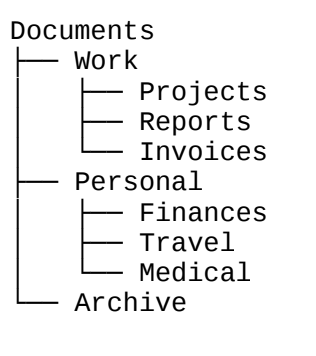
Best practices:
Use broad top-level folders like Work, Personal, or School
Keep folder depth to about three levels whenever possible
Avoid vague names such as “Misc” or “Stuff”
A clear structure reduces decision fatigue and makes files easier to locate.
Step 2: Use Consistent Naming Conventions
File names should tell you exactly what the document is without opening it.
A simple, effective format looks like this:
Date_ProjectOrKeyword_Status.extension
Examples:
2025-06-01_MarketingPlan_Draft.pdf
2024-12_Taxes_Final.xlsx
This approach makes files searchable, sortable, and readable across devices and platforms.
Consistency matters more than complexity. Pick a format and stick to it.
Step 3: Use Cloud Storage Intentionally
Cloud storage tools such as Google Drive, OneDrive, and Dropbox help protect files and make them accessible anywhere.
Benefits include:
Automatic backups
Cross-device access
Keyword search inside documents
Set your cloud service to automatically back up key folders such as Documents, Desktop, and Photos. This ensures important files are protected even if your device fails.
Step 4: Schedule a Weekly Digital Declutter
File organization is not a one-time task. It works best as a habit.
Once a week, take ten minutes to:
Delete or archive outdated files
Empty your Downloads folder
Move misplaced files into the correct folders
Rename unclear file names
Add this task to your calendar so it becomes routine. Small, regular maintenance prevents large messes later.
Step 5: Learn to Search Smarter
Modern operating systems have powerful built-in search tools. Knowing how to use them saves time even when files are not perfectly organized.
Helpful tips:
Search using keywords that appear inside the document
Filter by file type such as PDF or spreadsheet
Filter by date modified
Use Spotlight on Mac or File Explorer search filters on Windows
A good search strategy complements a good folder system.
Closing Thoughts
You do not need a flawless file system to stay organized. You need one that is easy to understand, easy to maintain, and aligned with how you work. Clear folder structures, consistent file names, cloud backups, and short weekly cleanups can save hours of frustration over time.
Organization is not about control. It is about creating space to focus on what matters.
Sources
Harvard Business Review
“Stop Wasting Time Searching for Digital Files”
https://hbr.org
The Verge
Digital Declutter and File Organization Guides
https://www.theverge.com
NPR
“How to Name Your Files So You Can Find Them Later”
https://www.npr.org
Google Drive Help
Back Up and Sync Documentation
https://support.google.com/drive
Cal Newport
Digital Declutter Framework
https://www.calnewport.com
Microsoft Support
Find and Organize Files in Windows
https://support.microsoft.com